Padma Vitals
Reimagining Ward Workflow for Padma Vitals Adoption
Clinical UX, Workflow Redesign, Field Research
ROLE
Service Designer
TIMEFRAME
2 months | 2025
TEAM
Cardiac Design Labs
SKILLS
User Experience, UI Design, Service Design
PROJECT OVERVIEW
How do we redesign a cardiac ward's monitoring system around how nurses actually work?
Visiting the cardiac ward to observe real nurse behavior, not just review requirements on paper.
Running the workflow past the design, software, and testing teams across multiple working sessions.
Rethinking not just individual screens, but how the CM dashboard and phone app should divide responsibilities.
PROBLEM
Nurses were working around the system, not with it.
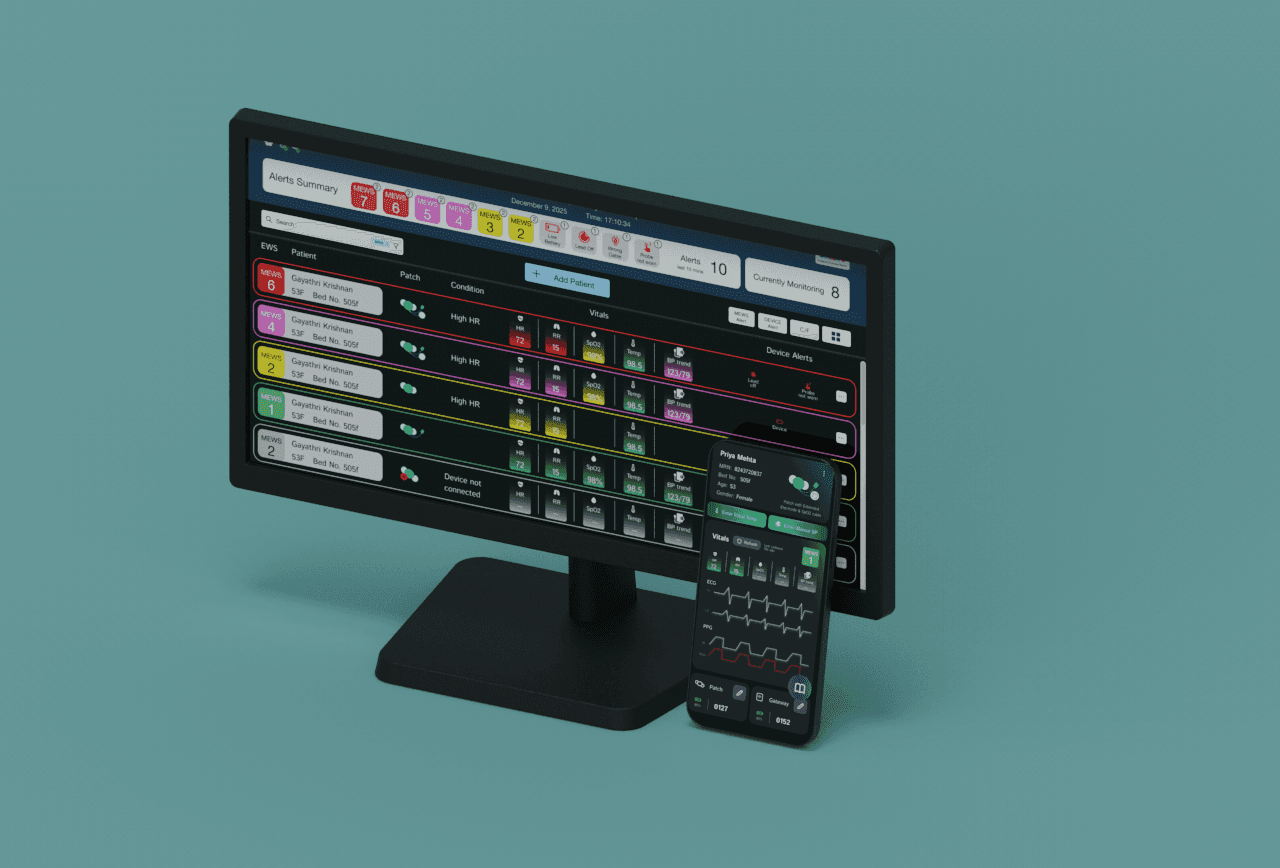
The CM dashboard was built to be the nurse's main tool for tracking patient vitals, but it wasn't matching how wards actually function. Nurses have too many competing tasks to sit and watch a dashboard, so the Central Monitor was often left unused for its intended viewer, and clinical alerts went unnoticed.
Visiting the ward made the deeper problems visible: Nurses moved constantly between their desk and each patient's bedside, often losing track of which patient and bed number they were handling, especially since different nurses managed different patients. Patch application had its own friction: devices got damaged from accidental bathing, patients often forgot they were even wearing a device since the patch had no visible indicator, and patient information had to be manually re-typed at the monitor even though it already existed in the hospital's system.
OPPORTUNITY
Moving key tasks from the nurse's desk to the patient's bedside.
Almost every friction point traced back to one root cause: the workflow assumed nurses could return to a central monitor, when in practice their day happens at the bedside.
A phone app at the bedside could eliminate the back-and-forth, instead of adding a second system to manage.
Battery, device connection, and patch-worn status needed to be obvious without disconnecting or guessing.
Clinical alerts (patient vitals) and device alerts (battery, connectivity) needed to be visually distinct so critical alerts wouldn't get lost.
SOLUTION
The Central Monitor dashboard moved towards a flatter, clutter-free UI, with Quick Actions added directly to each patient card (Change Device, Alert Settings, Trends, End Monitoring) so nurses could act without digging through menus. Clinical alerts and device alerts were visually separated so a critical patient alert would never blend in with a low-battery notice.
The Phone App became the primary tool for bedside tasks: adding a patient, selecting and pairing a patch and gateway, calibrating BP and temperature, and even guiding correct patch placement with an on-screen visual guide. Patient and device changes were consolidated into the app so nurses no longer needed to return to the central monitor for routine tasks.
CORE FLOWS

Adding a new patient and selecting their patch and gateway now happens in one flow, instead of split across two systems.

A step-by-step visual guide shows exactly where to place the patch, with variants for extended lead and SpO2 configurations.

Nurses enter initial BP and temperature readings directly at the bedside, syncing instantly to the dashboard.

LED indicators and in-app alerts show patch and gateway battery status without needing to disconnect anything.
Key Design Moments

Early plans centered entirely on the CM dashboard. It was only after the NH visit that the phone app was introduced as a first-class part of the workflow, not an add-on, shifting primary bedside functions like patient onboarding and calibration off the monitor entirely.

Alert states and Quick Actions needed to be readable in a split second during a busy shift.

Early versions mixed patient-vital alerts with device-status alerts in one stream. Separating them was a direct response to nurses missing critical alerts buried among low-battery notifications.

Since the patch itself has no light and lies flat against the body, nurses couldn't tell if it was connected. The team resolved this by adding an LED and gateway screen indicator confirming an active connection, directly addressing a confusion the NH visit revealed.
PROCESS
Mapping the system before designing a single screen.
Following the nurse's actual day, step by step.
Each stage was tagged with exactly where it happens (physical bedside, CM dashboard, or phone app), which is what surfaced how much of the workflow was being forced onto the CM dashboard alone, even for tasks that made far more sense at the bedside.
From low-fidelity to a working system.
Early low-fidelity CM screens were shown to the design, software, and testing teams before any high-fidelity work began, with the workflow shape decided collaboratively across working sessions before UI design started. Low-fidelity phone app screens followed the same path, tested against the finalized 12-stage journey to confirm which functions belonged on the app versus the dashboard.
What I learned
Watching beats asking.
Structured meetings surfaced requirements, but the real problems (like patients being skipped for patch application, or a nurse ignoring a lead-off alert) only became visible by watching a real shift unfold.
Small frictions compound into system failures.
No single issue, like manually re-typing patient info or a hard-to-see LED, seemed critical on its own. Together, they explained why the entire dashboard was going unused.

